> For the complete documentation index, see [llms.txt](https://kos0ng.gitbook.io/ctfs/llms.txt). Markdown versions of documentation pages are available by appending `.md` to page URLs; this page is available as [Markdown](https://kos0ng.gitbook.io/ctfs/write-up/2025/deadsec-ctf/reverse-engineering.md).
# Reverse Engineering
## Yet-another-maze (437 pts)
### Description
Yet another simple maze!
Four buttons are hidden within its walls. The flag will appear when all of them are activated.
### Solution
Through unzipping the archive we can see that the challenge made with unity. Logic of the game are stored in `GameAssembly.dll` and we can utilize [il2cppdumper](https://github.com/Perfare/Il2CppDumper/releases/tag/v6.7.46) to recover the function name and struct from global-metadata.dat and apply it on pseudocode of GameAssembly.dll.
* Create `Dump` directory first
* Run command below
```powershell
.\Il2CppDumper.exe ..\..\yet-another-maze\GameAssembly.dll ..\..\yet-another-maze\yet-another-maze_Data\il2cpp_data\Metadata\global-metadata.dat .\Dump
```
Open GameAssembly.dll in IDA and load script `ida_with_struct_py3.py` then
* Choose `script.json` from .\Dump directory
* Choose `il2cpp.h` from .\Dump directory
After script running completely we can see many functions renamed, for a reference we can decompile `Assembly-CSharp.dll` in directory .\Dump\DummyDll using `dnSpy`.
In ida we can see the pseudocode for each function, for example for function Awake in `GameManager` class.
Through running the game and from the title we know that the game is about maze, in this case player put in a maze and need to find something in a maze which later we know that we need to find a `button` and `press` it.
Lets take a look on level file by [UABEA](https://github.com/nesrak1/UABEA) and click on `View Scene`.
Expanding the `m_LocalPosition` in Button Object we can see the coordinate of the Button
Back to IDA, take a look XREF on function `GameManager_CalculateSHA256`.
```c
void __stdcall GameManager__OnButtonPressed(
GameManager_o *this,
UnityEngine_Vector3_o *buttonPosition,
const MethodInfo *method)
{
float v3; // xmm0_4
System_String_o *previousHash; // rsi
System_String_o *v6; // rdi
System_String_o *v7; // rbx
System_String_o *v8; // rax
System_String_o *v9; // rax
System_String_o *v10; // rdi
System_String_o *v11; // rbx
System_String_o *v12; // rax
struct System_String_o *v13; // rax
__int64 v14; // rdx
__int64 v15; // r8
int v16; // eax
__int64 v17; // rdx
__int64 v18; // r8
__int64 v19; // rdx
__int64 v20; // r8
UnityEngine_Object_o *flagText; // rbx
UnityEngine_Component_o *v22; // rcx
UnityEngine_GameObject_o *gameObject; // rax
struct TMPro_TextMeshProUGUI_o *v24; // rbx
System_String_o *v25; // rax
if ( System_String__IsNullOrEmpty(this->fields.previousHash, 0i64) )
{
v10 = System_Single__ToString(v3, 0i64);
v11 = System_Single__ToString(v3, 0i64);
v12 = System_Single__ToString(v3, 0i64);
v9 = System_String__Concat_6448928912(v10, v11, v12, 0i64);
}
else
{
previousHash = this->fields.previousHash;
v6 = System_Single__ToString(v3, 0i64);
v7 = System_Single__ToString(v3, 0i64);
v8 = System_Single__ToString(v3, 0i64);
v9 = System_String__Concat_6448927536(previousHash, v6, v7, v8, 0i64);
}
v13 = GameManager__CalculateSHA256(this, v9, 0i64);
this->fields.previousHash = v13;
sub_18016E9A0(&this->fields.previousHash, v13);
v16 = this->fields.buttonsPressedCount + 1;
this->fields.buttonsPressedCount = v16;
if ( v16 >= this->fields.totalButtons )
{
if ( !byte_180F57C43 )
{
sub_18016F610(&UnityEngine_Object_TypeInfo, v14, v15);
sub_18016F610(&StringLiteral_2654, v17, v18);
sub_18016F610(&StringLiteral_5332, v19, v20);
byte_180F57C43 = 1;
}
flagText = (UnityEngine_Object_o *)this->fields.flagText;
if ( !UnityEngine_Object_TypeInfo->_2.cctor_finished )
il2cpp_runtime_class_init();
if ( UnityEngine_Object__op_Inequality(flagText, 0i64, 0i64) )
{
v22 = (UnityEngine_Component_o *)this->fields.flagText;
if ( !v22
|| (gameObject = UnityEngine_Component__get_gameObject(v22, 0i64)) == 0i64
|| (UnityEngine_GameObject__SetActive(gameObject, 1, 0i64),
v24 = this->fields.flagText,
v25 = System_String__Concat_6448928912(
(System_String_o *)StringLiteral_2654,
this->fields.previousHash,
(System_String_o *)StringLiteral_5332,
0i64),
!v24) )
{
sub_18016F7F0(v22);
}
((void (__fastcall *)(struct TMPro_TextMeshProUGUI_o *, System_String_o *, const MethodInfo *))v24->klass->vtable._66_set_text.methodPtr)(
v24,
v25,
v24->klass->vtable._66_set_text.method);
}
UnityEngine_Cursor__set_lockState(0, 0i64);
UnityEngine_Cursor__set_visible(1, 0i64);
}
}
```
From code above we can see that there is a process of converting some value to string, append it previous hash, and hash it using `SHA256`. After that it will check count of pressed button and total button then if count of pressed button greater it will show flag. Now we need to know the value of data before it hashed, to do that we can debug the program.
To debug the program we need to set the executable to yet-another-maze.exe, change it on `Debugger > process options > Application`. Set breakpoint on `0x1801D8C0C`, instruction on that address is executed if we press `e` in game.
Scrolling down on the same function (`PlayerInteraction_Update`)
```c
if ( UnityEngine_Physics__Raycast_6452081552(&v25, &v24, &v26, interactionDistance, 0i64) )
{
collider = (UnityEngine_Component_o *)UnityEngine_RaycastHit__get_collider(&v26, 0i64);
if ( !collider )
goto LABEL_24;
Component_object = UnityEngine_Component__GetComponent_object_(
collider,
(const MethodInfo_23BDA0 *)Method_UnityEngine_Component_GetComponent_ButtonController___);
if ( !UnityEngine_Object_TypeInfo->_2.cctor_finished )
il2cpp_runtime_class_init();
if ( UnityEngine_Object__op_Inequality((UnityEngine_Object_o *)Component_object, 0i64, 0i64) )
{
if ( !Component_object )
goto LABEL_24;
if ( !byte_7FFA2D277C41 )
{
sub_7FFA2C48F610(&Method_UnityEngine_Component_GetComponent_Renderer___, v17);
sub_7FFA2C48F610(&GameManager_TypeInfo, v18);
byte_7FFA2D277C41 = 1;
}
if ( !LOBYTE(Component_object[2].klass) )
{
LOBYTE(Component_object[2].klass) = 1;
v19 = UnityEngine_Component__GetComponent_object_(
(UnityEngine_Component_o *)Component_object,
Method_UnityEngine_Component_GetComponent_Renderer___);
if ( v19 )
{
UnityEngine_Renderer__set_sharedMaterial(
(UnityEngine_Renderer_o *)v19,
(UnityEngine_Material_o *)Component_object[3].klass,
0i64);
v20 = UnityEngine_Component__get_transform((UnityEngine_Component_o *)Component_object, 0i64);
if ( v20 )
{
v21 = UnityEngine_Transform__get_position(&v24, v20, 0i64);
playerCamera = (UnityEngine_Component_o *)GameManager_TypeInfo->static_fields->instance;
if ( playerCamera )
{
v22 = *(_QWORD *)&v21->fields.x;
v23 = v21->fields.z;
*(_QWORD *)&v25.fields.x = v22;
v25.fields.z = v23;
GameManager__OnButtonPressed((GameManager_o *)playerCamera, &v25, 0i64);
return;
}
}
}
LABEL_24:
sub_7FFA2C48F7F0(playerCamera);
}
}
}
```
Code above basically check if we collide with an object and that object is a button object it will continue the process (calling `GameManager__OnButtonPressed`). Previously we've been looking at function GameManager\_\_OnButtonPressed that create hash and showing flag if all button has been pressed. So, we can utilize this process to find what string is hashed. Following is the idea to hit `GameManager__OnButtonPressed`
* Need to make `Component_object` is valid button object
* We can do this by getting address of actual button component object by setting up breakpoint at `ButtonController$$Start+34`
* Debug it to make sure `GameManager__OnButtonPressed`
* To make debugging easier, press e while hitting a collider like a wall so we don't need to bypass the `collider` check
* Setting up breakpoint at `PlayerInteraction$$Update+198`
During debugging process we got following values (address of button object) at breakpoint `ButtonController$$Start+34`
* 0000026EC1304980
* 0000026EC1304940
* 0000026EC1304900
* 0000026EC13048C0
If the execution hit breakpoint at `PlayerInteraction$$Update+198` , set rax value with one of value of button object we got, for example 0000026EC1304980. In address `PlayerInteraction$$Update+1F3` , set IP to `PlayerInteraction$$Update+1F5` then continue step in and we will hit instruction that call `GameManager__OnButtonPressed`.
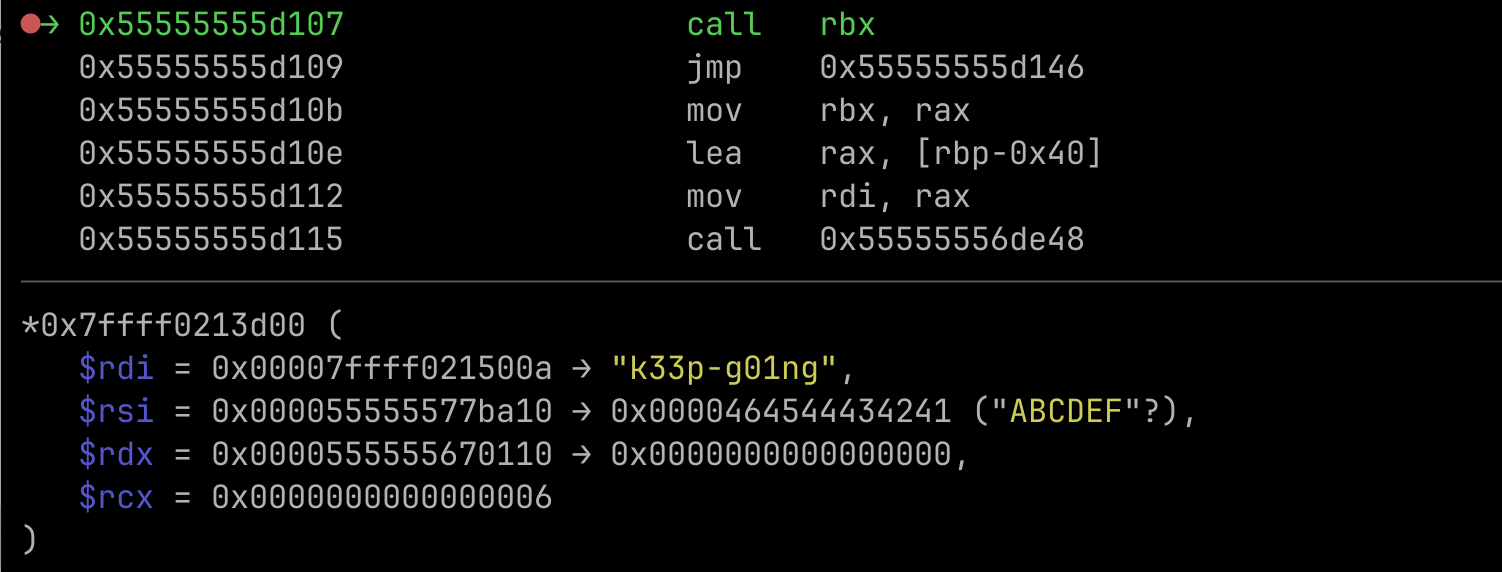
Next, setup breakpoint at `GameManager$$OnButtonPressed+B8` and continue the process. In second argument we can see a pointer that store value of plaintext which is `257.29461586.2037` and from level 0 we can see that the those value is produced from the position of `Button_Object_3`
By looking at the result of hash in rax after calling the function we can see that it match with our SHA256 implementation
Let's continue to next step which is trying to press another button. Do the same flow but with different address of button object which is `0000026EC1304940`. Now we can see that the hash value is appended with a next coordinate value.
Continue the execution and we will see the new hash value which is same with our SHA256 implementation.
If we look at coordinate value we can see that the coordinate is the coordinate for `Button_Object_1`. With this information we can reconstruct the actual hash with correct order which is 1,2,3, and 4. Following is my script to solve the challenge.
```python
import hashlib
def conv(a1):
return str(float(f"{a1:.7g}"))
button = [{} for i in range(5)]
button[2]['x'] = 31.07088
button[2]['y'] = 1
button[2]['z'] = 1953.2948
button[1]['x'] = 2036.4781
button[1]['y'] = 1
button[1]['z'] = 1974.1917
button[4]['x'] = 1155.5647
button[4]['y'] = 1
button[4]['z'] = 298.97897
button[3]['x'] = 257.29465
button[3]['y'] = 1
button[3]['z'] = 586.20374
button_order = [1, 2, 3, 4]
prev_hash = ""
for i in button_order:
pt = prev_hash + conv(button[i]['x']) + str(button[i]['y']) + conv(button[i]['z'])
h = hashlib.sha256(pt.encode()).hexdigest()
prev_hash = h
print(f"DEAD{{{prev_hash}}}")
```
Flag: DEAD{d1b6b7f78e983bb6089645be5111e3b4626a93b3b2ee810092c9abefc0a462b1}
## magic\_in\_packets (500 pts) 🥇
### Description
This is ebee, the ultimate packet processor for ya
### Solution
Given 2 files as following
* ebee - ELF 64-bit LSB pie executable, x86-64
* prog.o - ELF 64-bit LSB relocatable, eBPF, version 1 (SYSV), not stripped
Lets decompile the ebee file using IDA, from main function we know how to run the executable
```bash
Usage: %s \n
```
`bpf_obj_file` should be prog.o but what is ifname? take a look on function `sub_40102` below
__int64 __fastcall sub_40102(float a1, double a2, __int64 a3, __int64 a4)
{
  sigaction act; // [rsp+10h] [rbp-D0h] BYREF
  int v6; // [rsp+ACh] [rbp-34h]
  __int64 v7; // [rsp+B0h] [rbp-30h]
  int map_fd_by_name; // [rsp+B8h] [rbp-28h]
  int v9; // [rsp+BCh] [rbp-24h]
  __int64 v11; // [rsp+C8h] [rbp-18h]
  __int64 v12; // [rsp+D0h] [rbp-10h]
  char *ifname; // [rsp+D8h] [rbp-8h]

  ifname = *(char **)(a4 + 8);
  v12 = *(_QWORD *)(a4 + 16);
  dword_71878 = if_nametoindex(ifname);
  dword_7187C = 0;
  if ( dword_71878 )
  {
    memset(&act, 0, sizeof(act));
    act.sa_handler = (__sighandler_t)sub_3FFFD;
    sigaction(2, &act, 0LL);
    sigaction(15, &act, 0LL);
    v11 = bpf_object__open(v12);
    if ( v11 )
    {
      if ( (unsigned int)bpf_object__load(v11) )
      {
        perror("bpf_object__load");
        std::operator<<<std::char_traits<char>>(&std::cerr, "failed to load the eBPF program\n");
        return 1LL;
      }
      else if ( bpf_object__find_program_by_name(v11, (__int64)"check_packets") )
      {
        v9 = bpf_program(a1, a2);
        if ( v9 >= 0 )
        {
          if ( (unsigned int)bpf_xdp_attach((unsigned int)dword_71878, (unsigned int)v9, (unsigned int)dword_7187C, 0LL) )
          {
            std::operator<<<std::char_traits<char>>(&std::cerr, "failed to attach the program to network interface\n");
            return 1LL;
          }
          else
          {
            map_fd_by_name = bpf_object__find_map_fd_by_name(v11, "ebee_map");
            if ( map_fd_by_name >= 0 )
            {
              v7 = ring_buffer__new((unsigned int)map_fd_by_name, sub_40076, 0LL, 0LL);
              if ( v7 )
              {
                while ( 1 )
                {
                  v6 = ring_buffer__consume(v7);
                  if ( v6 < 0 )
                    break;
                  sleep(1u);
                }
                std::operator<<<std::char_traits<char>>(&std::cerr, "ring_buffer__consume error\n");
                return 0LL;
              }
              else
              {
                std::operator<<<std::char_traits<char>>(&std::cerr, "failed to create the ring buffer\n");
                return 1LL;
              }
            }
            else
            {
              perror("bpf_object__find_map_fd_by_name");
              std::operator<<<std::char_traits<char>>(&std::cerr, "failed to find the file descriptor of ebee_map\n");
              return 1LL;
            }
          }
        }
        else
        {
          perror("bpf_program__fd");
          std::operator<<<std::char_traits<char>>(
            &std::cerr,
            "failed to retrieve the file descriptor of the eBPF program\n");
          return 1LL;
        }
      }
      else
      {
        std::operator<<<std::char_traits<char>>(&std::cerr, "failed to open the XDP program\n");
        return 1LL;
      }
    }
    else
    {
      std::operator<<<std::char_traits<char>>(&std::cerr, "failed to open the eBPF object file\n");
      return 1LL;
    }
  }
  else
  {
    perror("if_nametoindex");
    return 1LL;
  }
}
* `ifname` passed to `if_nametoindex`, so ifname is network interface name.
* We can see list of interface name by using linux command such as ifconfig, ip a, etc
* bpf program (prog.o) loaded and then the ebee program will find `check_packets` function
* ebee will attach function `check_packets` to network interface that we passed before through argument
* `check_packets` will process packet that has been sent to the interface and then ebee program will check if there is `ebeep_map`
* if yes, it will create new ring buffer and execute the callback function which is `sub_40076`
So we need to know what check\_packets do first, we can dump the instruction using `llvm-objdump`
```bash
llvm-objdump -S --no-show-raw-insn prog.o
```
```nasm
prog.o: file format elf64-bpf
Disassembly of section xdp:
0000000000000000 :
; void *data_end = (void *)(long)ctx->data_end;
0: r2 = *(u32 *)(r1 + 0x4)
; void *data = (void *)(long)ctx->data;
1: r1 = *(u32 *)(r1 + 0x0)
; if (data + ip_header_offset > data_end) {
2: r7 = r1
3: r7 += 0xe
; if (data + ip_header_offset > data_end) {
4: if r7 > r2 goto +0x5e
; unsigned short h_proto = eth->h_proto;
5: r1 = *(u16 *)(r1 + 0xc)
; if (h_proto != htons(ETH_P_IP)) {
6: if r1 != 0x8 goto +0x5c
7: r1 = 0x14
8: r3 = r7
9: r3 += r1
; if ((void *)&ip_header[1] > data_end) {
10: if r3 > r2 goto +0x58
; if (ip_header->protocol != IPPROTO_UDP) {
11: r1 = *(u8 *)(r7 + 0x9)
12: if r1 != 0x11 goto +0x56
; struct udphdr *udp = (void *)ip_header + ip_header->ihl * 4;
13: r1 = *(u8 *)(r7 + 0x0)
14: r1 <<= 0x2
15: r1 &= 0x3c
; struct udphdr *udp = (void *)ip_header + ip_header->ihl * 4;
16: r7 += r1
; if ((void *)(udp + 1) > data_end) {
17: r6 = r7
18: r6 += 0x8
; if ((void *)(udp + 1) > data_end) {
19: if r6 > r2 goto +0x4f
; unsigned short port = __builtin_bswap16(udp->dest);
20: r8 = *(u16 *)(r7 + 0x2)
; if (payload + 20 <= (unsigned char *)data_end) {
21: r1 = r7
22: r1 += 0x1c
; if (payload + 20 <= (unsigned char *)data_end) {
23: if r1 > r2 goto +0x4b
; bpf_ringbuf_reserve(&ebee_map, sizeof(struct ebee_event), 0);
24: r1 = 0x0 ll
26: r2 = 0x18
27: r3 = 0x0
28: call 0x83
; if (!evt) {
29: if r0 != 0x0 goto +0x5
; bpf_printk("failed to allocate memory for the ring buffer");
30: r1 = 0x0 ll
32: r2 = 0x2e
33: call 0x6
; return XDP_PASS;
34: goto +0x40
35: r8 = be16 r8
36: r1 = 0x14
; evt->size = 20;
37: *(u32 *)(r0 + 0x14) = r1
; if ((payload[6] ^ port) == 8143) {
38: r1 = *(u8 *)(r7 + 0xe)
39: r8 ^= r1
40: if r8 != 0x1fcf goto +0x37
; if (((payload[7] + payload[8]) != 130) &&
41: r2 = *(u8 *)(r7 + 0xf)
42: r1 = *(u8 *)(r7 + 0x10)
43: r3 = r1
44: r3 += r2
; if (((payload[7] + payload[8]) != 130) &&
45: if r3 == 0x82 goto +0x2
46: r1 -= r2
47: if r1 != 0x1a goto +0x30
; if (payload[10] != 95) {
48: r1 = *(u8 *)(r7 + 0x12)
49: if r1 != 0x5f goto +0x2e
; if ((payload[9] + payload[10]) != 163) {
50: r1 = *(u8 *)(r7 + 0x11)
51: if r1 != 0x44 goto +0x2c
; __builtin_memcpy(evt->payload, payload, 20);
52: r1 = *(u8 *)(r6 + 0x13)
53: *(u8 *)(r0 + 0x13) = r1
54: r1 = *(u8 *)(r6 + 0x12)
55: *(u8 *)(r0 + 0x12) = r1
56: r1 = *(u8 *)(r6 + 0x11)
57: *(u8 *)(r0 + 0x11) = r1
58: r1 = *(u8 *)(r6 + 0x10)
59: *(u8 *)(r0 + 0x10) = r1
60: r1 = *(u8 *)(r6 + 0xf)
61: *(u8 *)(r0 + 0xf) = r1
62: r1 = *(u8 *)(r6 + 0xe)
63: *(u8 *)(r0 + 0xe) = r1
64: r1 = *(u8 *)(r6 + 0xd)
65: *(u8 *)(r0 + 0xd) = r1
66: r1 = *(u8 *)(r6 + 0xc)
67: *(u8 *)(r0 + 0xc) = r1
68: r1 = *(u8 *)(r6 + 0xb)
69: *(u8 *)(r0 + 0xb) = r1
70: r1 = *(u8 *)(r6 + 0xa)
71: *(u8 *)(r0 + 0xa) = r1
72: r1 = *(u8 *)(r6 + 0x9)
73: *(u8 *)(r0 + 0x9) = r1
74: r1 = *(u8 *)(r6 + 0x8)
75: *(u8 *)(r0 + 0x8) = r1
76: r1 = *(u8 *)(r6 + 0x7)
77: *(u8 *)(r0 + 0x7) = r1
78: r1 = *(u8 *)(r6 + 0x6)
79: *(u8 *)(r0 + 0x6) = r1
80: r1 = *(u8 *)(r6 + 0x5)
81: *(u8 *)(r0 + 0x5) = r1
82: r1 = *(u8 *)(r6 + 0x4)
83: *(u8 *)(r0 + 0x4) = r1
84: r1 = *(u8 *)(r6 + 0x3)
85: *(u8 *)(r0 + 0x3) = r1
86: r1 = *(u8 *)(r6 + 0x2)
87: *(u8 *)(r0 + 0x2) = r1
88: r1 = *(u8 *)(r6 + 0x1)
89: *(u8 *)(r0 + 0x1) = r1
90: r1 = *(u8 *)(r6 + 0x0)
91: *(u8 *)(r0 + 0x0) = r1
; bpf_ringbuf_submit(evt, 0);
92: r1 = r0
93: r2 = 0x0
94: call 0x84
; return XDP_PASS;
95: goto +0x3
; bpf_ringbuf_discard(evt, 0);
96: r1 = r0
97: r2 = 0x0
98: call 0x85
; }
99: r0 = 0x2
100: exit
```
We can see the original code as following
```c
void *data_end = (void *)(long)ctx->data_end;
void *data = (void *)(long)ctx->data;
if (data + ip_header_offset > data_end) {
if (data + ip_header_offset > data_end) {
unsigned short h_proto = eth->h_proto;
if (h_proto != htons(ETH_P_IP)) {
if ((void *)&ip_header[1] > data_end) {
if (ip_header->protocol != IPPROTO_UDP) {
struct udphdr *udp = (void *)ip_header + ip_header->ihl * 4;
struct udphdr *udp = (void *)ip_header + ip_header->ihl * 4;
if ((void *)(udp + 1) > data_end) {
if ((void *)(udp + 1) > data_end) {
unsigned short port = __builtin_bswap16(udp->dest);
if (payload + 20 <= (unsigned char *)data_end) {
if (payload + 20 <= (unsigned char *)data_end) {
bpf_ringbuf_reserve(&ebee_map, sizeof(struct ebee_event), 0);
if (!evt) {
bpf_printk("failed to allocate memory for the ring buffer");
return XDP_PASS;
evt->size = 20;
if ((payload[6] ^ port) == 8143) {
if (((payload[7] + payload[8]) != 130) &&
if (((payload[7] + payload[8]) != 130) &&
if (payload[10] != 95) {
if ((payload[9] + payload[10]) != 163) {
__builtin_memcpy(evt->payload, payload, 20);
bpf_ringbuf_submit(evt, 0);
return XDP_PASS;
bpf_ringbuf_discard(evt, 0);
}
```
* Ensure that the packet use UDP protocol
* Ensure that the length of payload <= 20
* And some packet validation as following
* payload\[6] ^ port == 8143
* payload\[7] + payload\[8] == 130
* payload\[9] + payload\[10] == 163
* payload\[10] == 96
We can easily found value for packet validation by hand, let's create script to send the packet.
{% code title="client.py" %}
```python
import socket
class PacketSender:
def __init__(self, target_ip: str):
self.target_ip = target_ip
def send_packet(self, payload: bytes):
try:
sock = socket.socket(socket.AF_INET, socket.SOCK_DGRAM)
sock.sendto(payload, (self.target_ip, self.target_port))
sock.close()
except Exception as e:
print(f"Err: {e}")
def create_payload(self, target_port: int) -> bytes:
self.target_port = target_port
length = 20
payload = bytearray(length)
payload[0] = ord('A')
payload[1] = ord('B')
payload[2] = ord('C')
payload[3] = ord('D')
payload[4] = ord('E')
payload[5] = ord('F')
# payload[6] ^ target_port == 8143
payload[6] = target_port ^ 8143
# payload[7] + payload[8] == 130
payload[7] = ord('A')
payload[8] = 130 - payload[7]
# payload[10] == 95
# payload[9] + payload[10] == 163
payload[10] = 95 # 0x5f
payload[9] = 163 - payload[10]
# junk for now
for i in range(11, length):
payload[i] = ord('A') + i - 11
return bytes(payload)
target_ip = "192.168.137.250"
target_port = 8000
sender = PacketSender(target_ip)
payload = sender.create_payload(target_port)
sender.send_packet(payload)
```
{% endcode %}
Setup breakpoint at callback function and run the program (use root privilege)
```bash
gef➤ pie b 0x40076
gef➤ pie run ens33 prog.o
```
After running `client.py`, program will hit breakpoint at `callback function`. So for the next step we can focus on callback function. Callback function is complicated, my first approach is to find instruction that make the return false or compare instruction. From several function called in beginning of function we notice that there is `LLVM` and `JIT` initialization, so there will be dynamic code compilation and execution. To make writeup easier to read i'll divide the validation on several part.
* a1 = input
#### First Validation
First validation will do xor process for input\[:4] and input\[4:8] then it will hash the result using crc32. Then crc32 hash will be compared with `0xFEB9A9BE`. Following is `crc32` function
So there is lookup process for specific code in JIT by using key `t1` and we know that the code will be in `v11` since v11 is called in above function. Setting up breakpoint on `0x96DA` and step in.
```bash
gef➤ pie b 0x96DA
```
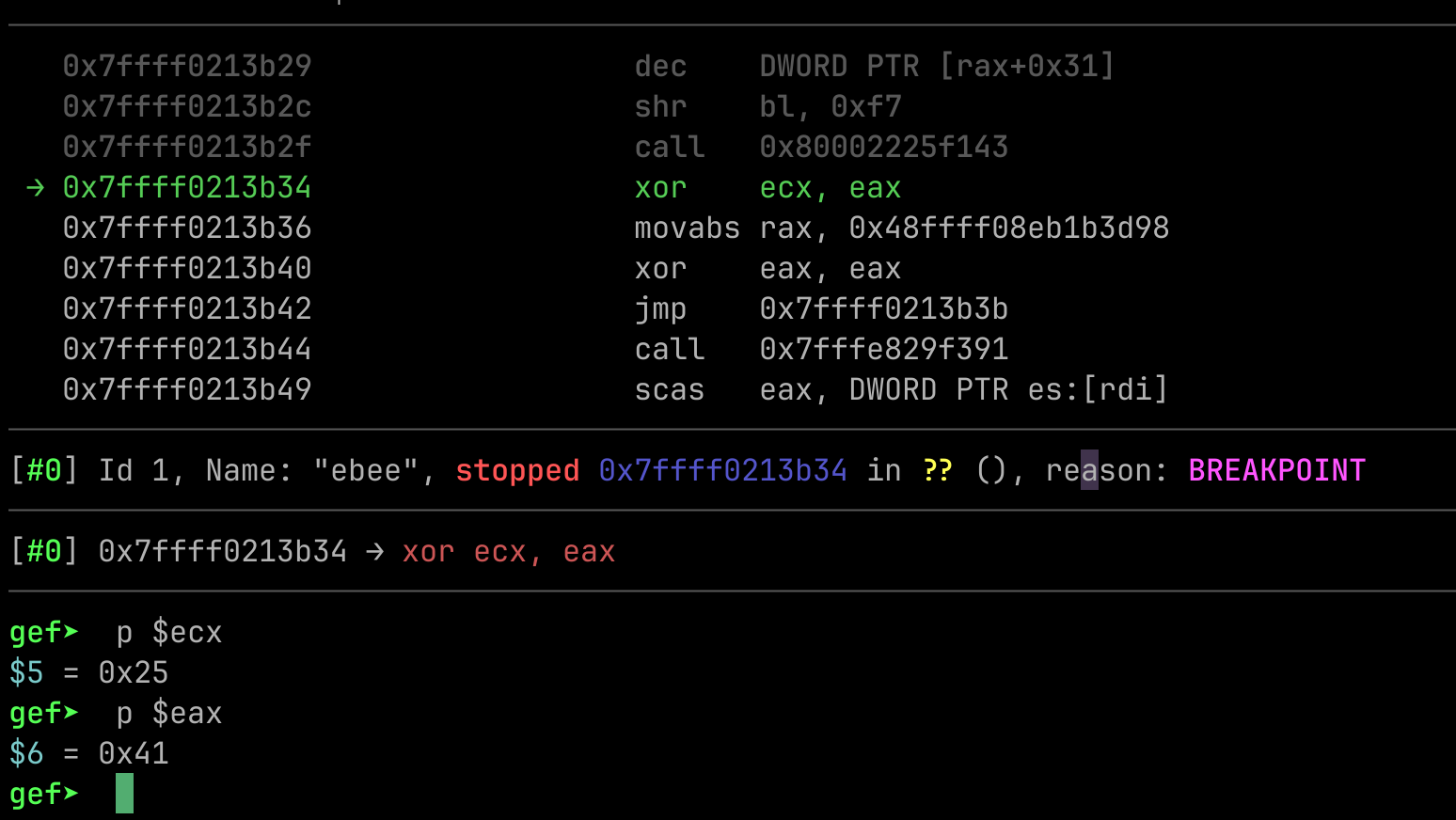
Looks like the code are obfuscated
```nasm
gef➤ x/20i $pc
=> 0x7fffeffcd000: endbr64
0x7fffeffcd004: push rbp
0x7fffeffcd005: mov rbp,rsp
0x7fffeffcd008: sub rsp,0x20
0x7fffeffcd00c: movabs rax,0x48ffff08ebd82667
0x7fffeffcd016: xor eax,eax
0x7fffeffcd018: jmp 0x7fffeffcd011
0x7fffeffcd01a: call 0x80002a788867
0x7fffeffcd01f: (bad)
0x7fffeffcd020: jmp 0x7fffeffcd02a
0x7fffeffcd022: (bad)
0x7fffeffcd023: dec DWORD PTR [rax+0x31]
0x7fffeffcd026: shr bl,0xf7
0x7fffeffcd029: call 0x7fff796b8876
0x7fffeffcd02e: jae 0x7fffeffcd01b
0x7fffeffcd030: or bh,bh
0x7fffeffcd032: dec DWORD PTR [rax+0x31]
0x7fffeffcd035: shr bl,0xf7
0x7fffeffcd038: call 0x7fffc6618885
0x7fffeffcd03d: cmps DWORD PTR ds:[rsi],DWORD PTR es:[rdi]
```
Previously i've been facing control flow obfuscation about `tail call` and `dead code`, and `binary ninja` can automatically defeat it. So i decide to dump the whole instruction and opening it in binary ninja.
{% code title="dump.py" %}
```python
#!/usr/bin/python3
class SolverEquation(gdb.Command):
def __init__ (self):
super (SolverEquation, self).__init__ ("dump-file",gdb.COMMAND_OBSCURE)
def invoke (self, arg, from_tty):
start = 0x7fffeffcd000
end = 0x7fffeffcd646
filename = "func1.bin"
gdb.execute(f"dump binary memory {filename} {start} {end}")
def addr2num(addr):
try:
return int(addr)
except:
return long(addr)
SolverEquation()
```
{% endcode %}
Call it using following command
```bash
gef➤ source dump.py
gef➤ dump-file
```
Following is decompiled result from binary ninja
```c
-------------SNIPPET-------------
0000017b (uint8_t)rdx_2 = var_28[(int64_t)var_10];
000001b7 var_c ^= (uint32_t)(uint8_t)rdx_2;
000001ba int32_t var_14_1 = 7;
000001d0 *(uint32_t*)rcx_2 = 2;
000001d0
00000218 while (true)
00000218 {
00000218 void* rcx_4 = &rsp[-2];
0000021c rsp = rcx_4;
0000022e *(uint32_t*)rcx_4 = 1;
00000252 int32_t rsi_2;
00000252
00000252 while (true)
00000252 {
00000252 rsi_2 = *(uint32_t*)rcx_4;
00000252
00000266 if (!rsi_2)
00000266 goto label_3bc;
00000266
0000043f if (rsi_2 == 1)
00000478 *(uint32_t*)rcx_4 = 2;
0000043f else
0000043f {
00000448 if (rsi_2 != 2)
00000448 break;
00000448
000004d1 if (var_14_1 < 0)
00000535 *(uint32_t*)rcx_4 = 0;
000004d1 else
000004f1 *(uint32_t*)rcx_4 = 3;
0000043f }
00000252 }
00000252
0000044f if (rsi_2 != 3)
0000044f break;
0000044f
000002f7 var_c = var_c >> 1 ^ ((0 - (var_c & 1)) & 0xedb88320);
00000309 *(uint32_t*)rcx_4 = 2;
0000035a var_14_1 = (var_14_1 ^ 0xffffffff) + ((var_14_1 & 0xffffffff) << 1);
00000218 }
00000218
000003bc label_3bc:
000003bc var_10 = (var_10 ^ 1) + ((var_10 & 1) << 1);
000000ed }
00000004 }
```
From the constant and operation we can see that it is `crc32` function, we can confirm it by checking the output from `v11` call and our `crc32` function
```python
from pwn import xor
import zlib
inp = b"ABCDEF\x8fA"
print(hex(zlib.crc32(xor(inp[:4], inp[4:8]))))
```
From the first 8 bytes value we don't know the actual value but we only know the hash of xored first 4 bytes and second 4 bytes. We can `bruteforce` 4 bytes actually but it still the result of xored value so i decide to continue the execution to see next validation.
```bash
gef➤ pie b 0x9CC1
gef➤ c
gef➤ set $eax=0xfeb9a9be
```
#### Second Validation
Scrolling down callback function we will see following of code